How to send new order notifications to your team members?
"so he is able to get email responses of all orders submitted"- Google Docs Editors Community
Google Forms only emails the people who can edit the form, and only with a link. If others pack or deliver your orders, you either forward each order by hand or make them editors, who can then change your form. With Neartail, you add your staff's email addresses to Notify collaborators, and each of them gets an email with the order details when a customer orders. They don't need to edit the form to get it.
Import your Google Form and follow the steps below.
How to add your staff members?
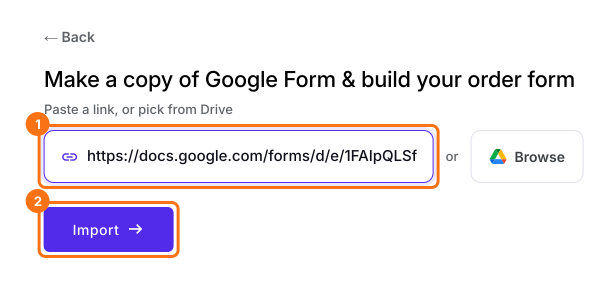
- On the page that opens, paste your Google Form's link or click Browse to pick it, then click Import.
- Select your currency and click Continue.
- When it says "Your order form is ready", Neartail has made a product from each question with a price and added an order total and summary. If it says no products were found, add a price to any question.
- Click Preview your form. Then, under Manage, click Edit form to open the form builder.
- Click on "Orders" tab

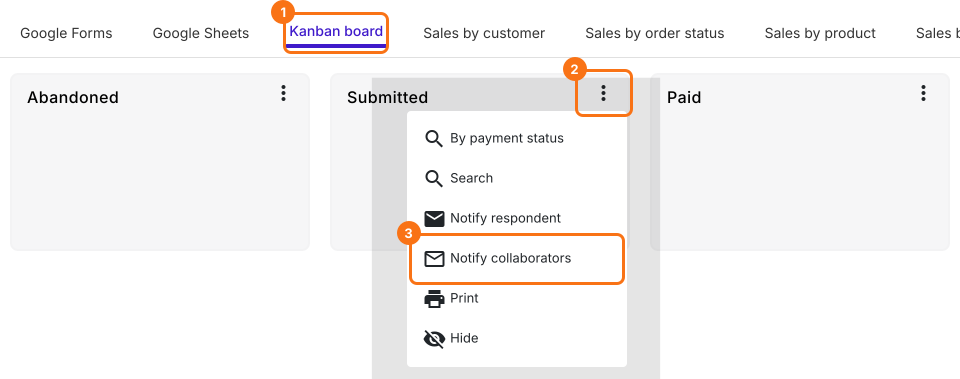
- Click Kanban board, click the ⋮ on Submitted and select Notify collaborators
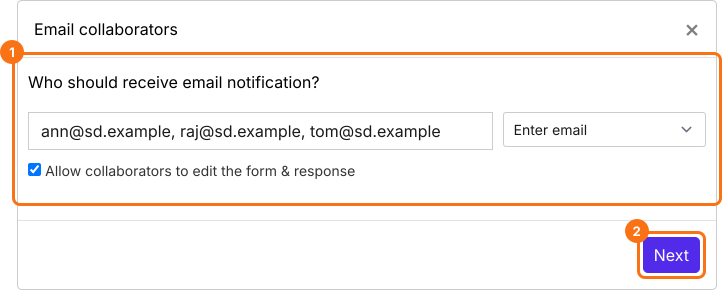
- You can enter a list of email addresses or an email group separated by commas in the Email collaborators step. Untick Allow collaborators to edit the form & response if they should only read the orders. Click on the Next button
- Your subject and message are already filled in, so click on the Next button twice
- Click on "Click here", submit a test response and click on the YES button
When a customer places an order, your staff members will receive an email with the order details.
Summary
Google Forms doesn't send order details to people who aren't editors. With Neartail, you add your staff's addresses and each of them gets the order details by email, without access to change the form. Import your Google Form and complete the steps above.
Send new orders from your form to your team.
Import your Google Form, add your staff's emails to Notify collaborators and untick Allow collaborators to edit, so they get orders but can't change the form.