How to set a minimum order quantity in your order forms?
Google Forms can check one answer at a time, but it can't add up what a customer picked across all your products. So a minimum such as six items per order can't be enforced: the small order comes in, and you're the one who goes back to the customer. In Neartail, the Order Quantity on your Google Form counts every item as it's picked, and you add a number validation to it. A customer below your minimum sees your message and adds more before they can submit. A maximum works the same way.
Import your Google Form and follow the steps below.
How to set a minimum order quantity?
- On the page that opens, paste your Google Form's link or click Browse to pick it, then click Import.
- Select your currency and click Continue.
- When it says "Your order form is ready", Neartail has made a product from each question with a price and added an order total and summary. If it says no products were found, add a price to any question.
- Click Preview your form. Then, under Manage, click Edit form to open the form builder.
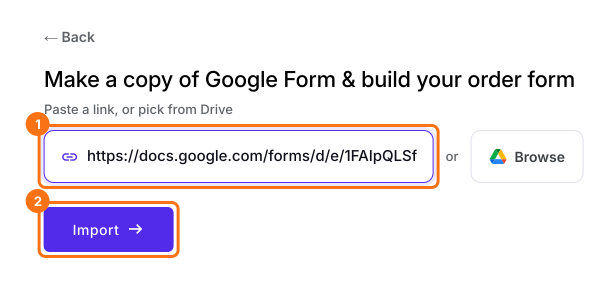
Your form now has your products and an order total question that adds up by itself.
To set a minimum order quantity, add a "greater than or equal to" number validation to the Order Quantity question. Your form doesn't have one yet, so add it first as in How to calculate the total quantity ordered by the users?
- Click on the Order Quantity question, then click the ⚙️ icon
- In Field settings, select the Answer tab. The QUANTITY formula is already in the Calculate option
- Click Configure under Validation
- Select "Greater than or equal to" number validation and enter the minimum quantity. Enter the error message and click Save
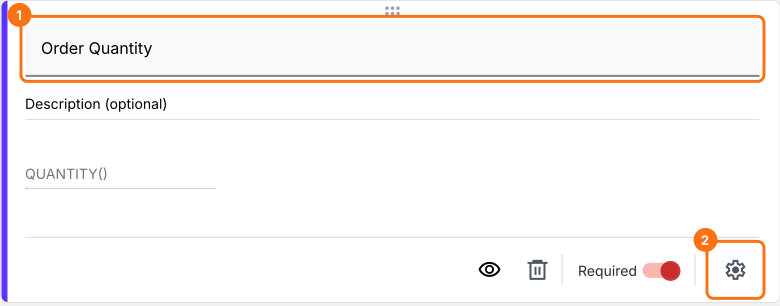
Similarly you can set a maximum order quantity by adding a "less than" number validation for the order quantity question.
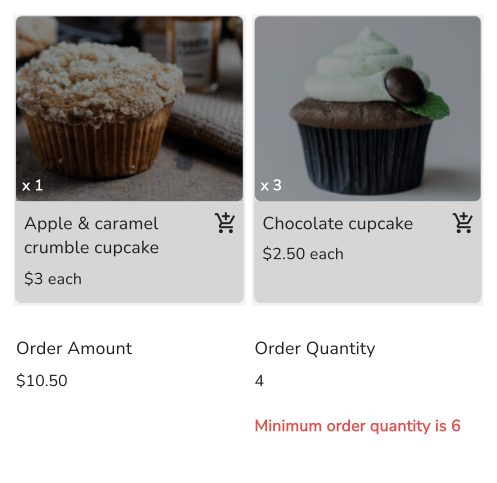
When an order is below your minimum, your customers see your error message on the form.
Summary
A Google Form can't count the items across an order, so it can't hold a minimum quantity. With Neartail, the Order Quantity counts them and a number validation stops orders below your minimum, with your message on the form. Import your Google Form and complete the steps above. If you have any questions, write to support.
Set a minimum order quantity on your order form.
Import your Google Form, add an Order Quantity and give it a number validation, so a customer below your minimum sees your message and adds more.