How to create a new form?
The first time you need a form, you might start from Google Forms, from a folder in Google Drive, or from the spreadsheet where the answers should end up. Google lets you create one for free from all three, and each gives you a form with Google's look. With Formfacade, you create a form with your own branding instead, and the responses are still collected in your Google Form, so you can sync them to Google Sheets and share them with your team.
Below are three ways to create a new form with Google's own tools. Each gives you a form with Google's look. For your own branding, create your form with Formfacade.
Create a Google Form
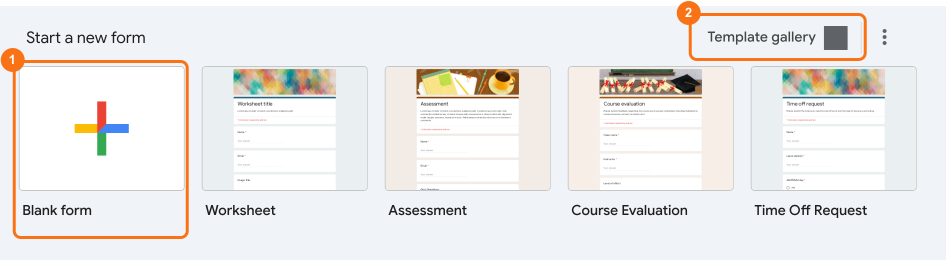
- Go to forms.google.com
- Click on + Blank form or an existing template
Create a form from Google Drive
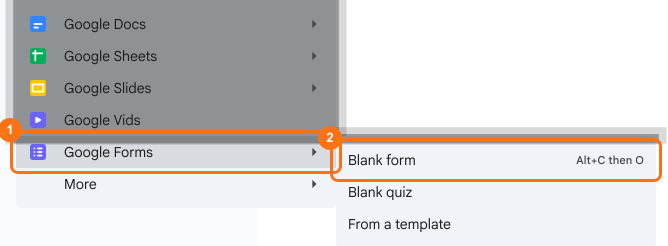
- Go to drive.google.com
- Right click or click on + New button, select Google Forms and click Blank form
Create a form in Google Sheets
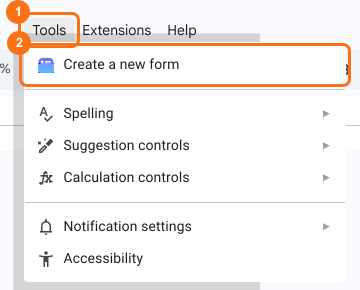
- Go to sheets.google.com
- Open an existing spreadsheet or create a new spreadsheet
- Click Tools > Create a new form
Summary
Create a new Google Form. Show it with your own branding.
Import the Google Form you made in Google Forms, Drive or Sheets so it shows with your own branding instead of Google's look.