How to add a question to Google Forms?
In Google Forms, every question starts with a type: a short answer for a name, multiple choice for one option, a date for a booking. Pick the wrong one and people can type anything, and your responses are harder to read and count later. Google Forms lets you add a question and choose its type, but the form your respondents see still looks like Google's. With Formfacade, you add a question with the + icon and choose its type the same way, and the form people fill shows your branding instead of Google's. The responses are still collected in your Google Form.
Import your Google Form, or open one you have in Formfacade, and follow the steps below.
Add a question
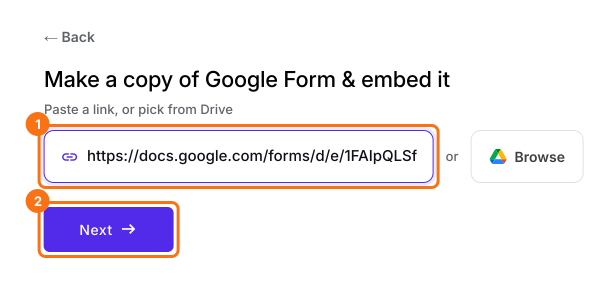
- On the page that opens, paste your Google Form's link or click Browse to pick it, then click Next. Your form opens on the Share tab. If you already have a form in Formfacade, open it instead.
- Click on "Edit" tab

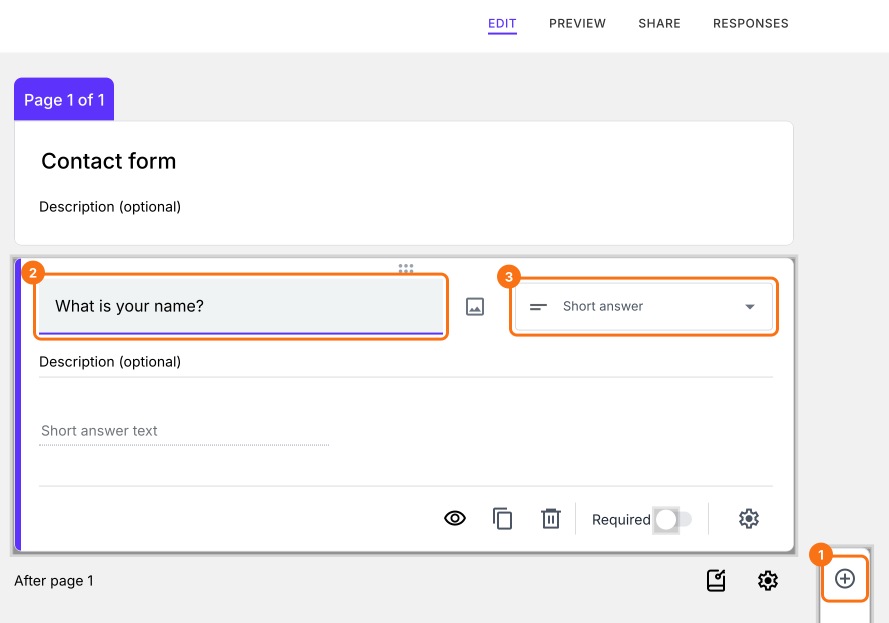
- Click on the + icon in the toolbar on the right. A new Short answer question will be added
- Enter the question title
- Choose the required question type
- If required, enable Required toggle button to make this a mandatory question
How to use each question type?
Summary
Add a question to your Google Form and pick its type.
Import your Google Form to embed it, click the + icon on the Edit tab and choose the question's type, so your responses are easy to read and count.