How do I fix the missing "Embed" and "Customize" options in the Formfacade menu?
You open your Google Form, click the add-on icon, choose Formfacade - Embed Google Forms™, and the menu shows only Help. Embed in a webpage and Customize this form are missing, so it looks as if the add-on has stopped working. Nothing is wrong with the add-on: the menu opened before your Google Form finished loading. Let the form load fully, then open the add-on menu again.
If you open your Google Form, click on the add-on icon and select Formfacade - Embed Google Forms™ immediately, sometimes only the Help option is displayed in the menu. This is a Google Workspace issue.
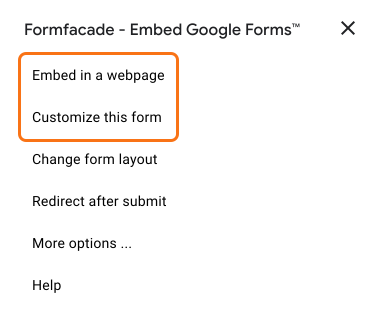
Wait until your Google Form has finished loading, then click on the add-on icon again and select Formfacade - Embed Google Forms™. Embed in a webpage and Customize this form are in the menu.
Summary
If only the Help option shows in the Formfacade add-on menu, your Google Form had not finished loading when you opened it. Wait for the form to load, then click the add-on icon again, and Embed in a webpage and Customize this form will be in the menu. If you have any questions, write to support.
Get Embed and Customize back in your Formfacade menu.
Import your Google Form to customize it. With the add-on, let your Google Form finish loading before you open its menu, so Embed and Customize show.