How to assign points for a checkboxes question?
"Google Forms: Count points for each correct item"- Google Docs Editors Community
On a checkboxes question with several right answers, a Google Forms quiz gives the points only when someone ticks exactly the right set. Tick three of the four right answers and the question scores zero. On the thread above, 13 people on Google's forum have asked how to count points for each correct item instead. Working it out in a Google Sheet means a formula per question, and the person who answered never sees the result. With Formfacade, you give every choice in a checkboxes question its own points, and the points for the boxes someone ticks are added into their score. A wrong choice can carry negative points, and people see their score change as they tick.
Let's start. Import your Google Form and follow the steps below.
How to assign points and calculate scores using Formfacade?
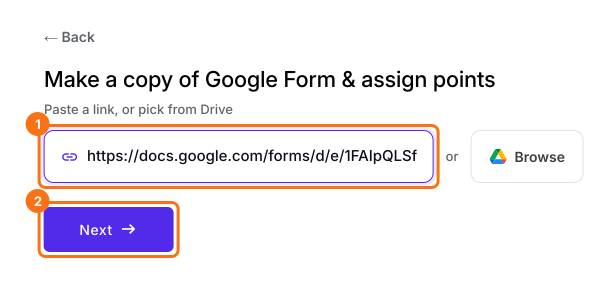
- On the page that opens, paste your Google Form's link or click Browse to pick it, then click Next.
- Glass of water = 1
- Fresh fruits & veggies = 2
- Nuts for snacks = 2
- Daily exercise = 10
- Soda, cocktails or drinks = -3
- Cookies, cakes or sweets = -5
- Fried food / Fast food = -6
- Refined grains = -1
- A description is already written under "Describe how you want to score this form". Change it to say how you want to score your form, for example: "Give each choice in the checkboxes question its own points: Glass of water = 1, Fresh fruits & veggies = 2, Nuts for snacks = 2, Daily exercise = 10, Soda, cocktails or drinks = -3, Cookies, cakes or sweets = -5, Fried food / Fast food = -6, Refined grains = -1. Add up the points for the boxes someone ticks." Click Next.
- "How do you want to score?" shows what it did. Click View points to check the points for each answer, then click Next.
- On "You're all set!", click Preview form. Your form opens with its score. The Score changes as you answer.
Summary
Add up points for each box ticked in your checkboxes question.
Import your Google Form and describe the points for each choice, negative ones too. The boxes someone ticks make their score, which changes as they tick.